The Architecture of On-Device Processing
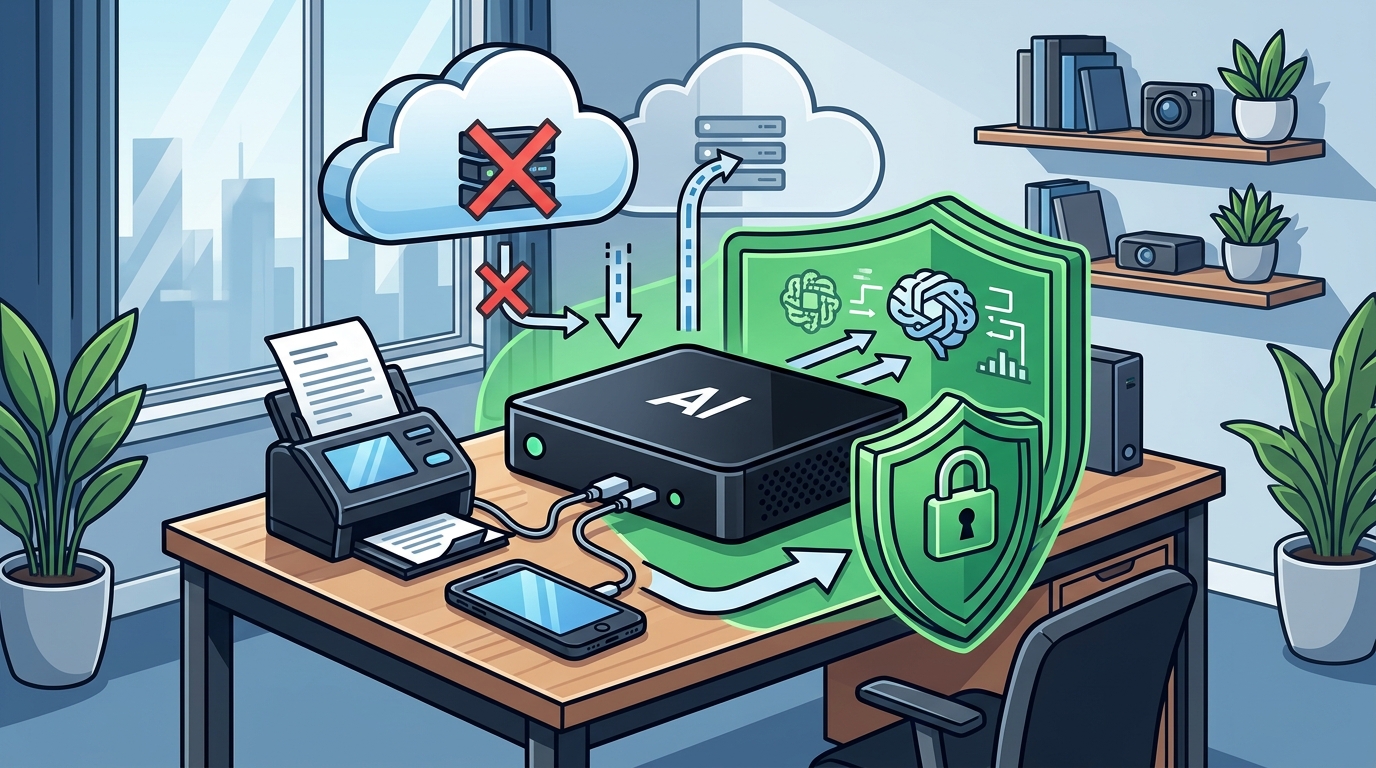
Local inference is the execution of artificial intelligence models directly on the hardware of the user's device rather than on remote servers. In a traditional cloud-based setup, every prompt and document is transmitted over the internet to a data center. This transmission creates a window of vulnerability where data can be intercepted or logged. By contrast, local processing keeps the data within the physical boundaries of the machine. The data remains in the local memory and is processed by the local processor without external transmission. For additional details, review the .
Overwatch OS and Data Sovereignty
Overwatch OS is the operating system that manages the local AI environment and user permissions. It is designed to give owners explicit control over their data, memory, and agent permissions. Unlike general-purpose operating systems that may prioritize cloud synchronization, Overwatch OS prioritizes local data sovereignty. The system is planned to be open-source, which allows for transparency in how data is handled and stored. This transparency is critical for professionals who need to verify that no hidden data exfiltration is occurring. For additional details, review the Customer Experience.
Managing Optional Cloud Integrations
While local processing is the default, some workflows may require optional cloud services or external integrations. These integrations may send data outside the device with your authorization and may carry separate fees. It is crucial to understand that local processing does not guarantee complete security or regulatory compliance if data is explicitly sent to the cloud. Users must carefully review the permissions granted to any external service. Black Box Desktop AI provides clear indicators when data is being transmitted externally, ensuring that the user is always aware of the data flow.
Practical Implications for Professionals
Running AI locally has significant implications for how professionals manage their daily workflows. It reduces the risk of data breaches associated with third-party cloud providers. It also ensures that client data is not used to train external models without explicit consent. This is a critical distinction for industries with strict confidentiality requirements. The local nature of the processing means that the data is not aggregated with data from other users, further enhancing privacy. For additional details, review the Frequently Asked Questions.
Key Takeaways
- Local inference keeps data on the device, preventing transmission to external servers.
- Overwatch OS provides owner-controlled permissions for data and agent access.
- Optional cloud services may transmit data externally with user authorization.
- Local processing does not guarantee regulatory compliance or absolute security.
- AI outputs require human review and are not a substitute for professional advice.
- Transparency in the operating system helps verify that no hidden data exfiltration occurs.
Frequently Asked Questions
Does local AI processing guarantee that my data is never seen by anyone else?
Local processing ensures that data is not transmitted to external servers for inference. However, it does not guarantee absolute security against all potential threats, such as physical theft of the device or malware on the local system. Users must still maintain good security practices, including strong passwords and regular software updates.
Can I use Black Box Desktop AI for legal or medical documents?
Is Overwatch OS already available for download?
Overwatch OS is planned to be open-source, but it has not yet been released. The system is currently under development. Users should check the official Black Box Desktop AI page for the latest updates on availability and release timelines.
What happens if I enable optional cloud services?
If you enable optional cloud services, data may be sent outside the device with your authorization. These services may carry separate fees and are subject to the terms of the external provider. You should carefully review the privacy policies of any external service you choose to integrate.
How much storage do I need for local AI models?
Can I customize the AI agents in Overwatch OS?
Conclusion
Running AI models locally on your device is a powerful way to protect sensitive client information. By keeping data on-device, you reduce the risk of external breaches and maintain control over your data. Black Box Desktop AI is designed to provide this level of privacy and control, with a robust hardware configuration and a transparent operating system. As you consider your options for local AI, remember that local processing is a tool, not a magic solution. You must still maintain good security practices and review all AI outputs. To learn more about how Black Box Desktop AI can support your workflow, visit the Black Box Desktop AI page.